
Email Tracking Control
Manage email tracking based on your contacts' consent.
Overview
Email Tracking Control gates email tracking behind a per-contact consent signal. This covers open pixels, click tracking, and the View in Browser (VIB) link. When you enable it, Netcore tracks only the contacts marked as consented. Everyone else still receives the email. They just don't get tracked.
This is a generic capability. Use it to honor recipient tracking preferences for any audience. You can also use it to meet region-specific tracking-consent requirements. For example, some marketers use this to align with CNIL's rules for contacts in France. The platform enforces the setting. You decide who counts as consented, and why.
This setting works at the account level. When you enable it, tracking becomes consent-gated for every contact in your account on the next send. If you want to enforce this for only a subset of contacts, set the consent attribute selectively on those contacts.
Who should enable this
Enable this feature if you want user-level tracking control based on consent value. This applies to any marketer who needs to honor recipient tracking preferences, whether that's driven by a specific regulation, a platform policy, or your own data governance standards.
How it works
Netcore reads one attribute on each contact record at send time. This is the email consent attribute. It uses this value to decide whether to track that recipient.
- Consent given (attribute value = 1): Netcore injects the open pixel, wraps links for click tracking, and includes the View in Browser link. Tracking works as normal.
- Consent not given (attribute value = 0), missing, or blank: Netcore skips the open pixel and link wrapping. It removes the View in Browser link. The recipient still receives the email. Only tracking is suppressed.
Netcore makes this decision per recipient, not per campaign. So a single send can contain a mix of tracked and untracked emails.
A few things stay the same regardless of consent:
- Netcore always records delivery, bounce, and unsubscribe events. Suppressing tracking doesn't affect deliverability reporting.
- The unsubscribe link works the same for every contact. Netcore never wraps it or tracks it, regardless of the consent value. Consent only controls open and click tracking.
- Switching the control back to Disable restores standard tracking for all contacts from the next send onward. It doesn't affect sends already in progress.
Setting the consent attribute
Netcore provides a system-generated consent attribute on the contact record. You don't create this attribute. You map your consent data to it. You can do this in three ways:
- During contact import: Map the relevant column in your file to the system consent attribute.
- Through the API: Update the attribute value for a contact directly.
- Manually: Edit the attribute value on an individual contact's detail view.
Netcore accepts two values: 1 for consent given, and 0 for consent not given.
Default behavior when the attribute or value is missing: If a contact record has no value mapped to this attribute, or the field is blank, Netcore treats that contact as not consented. It doesn't track them. This is the default, safe behavior. It means you don't need to explicitly set every contact to 0. Any contact without a 1 is automatically excluded from tracking.
Enable Email Tracking Control
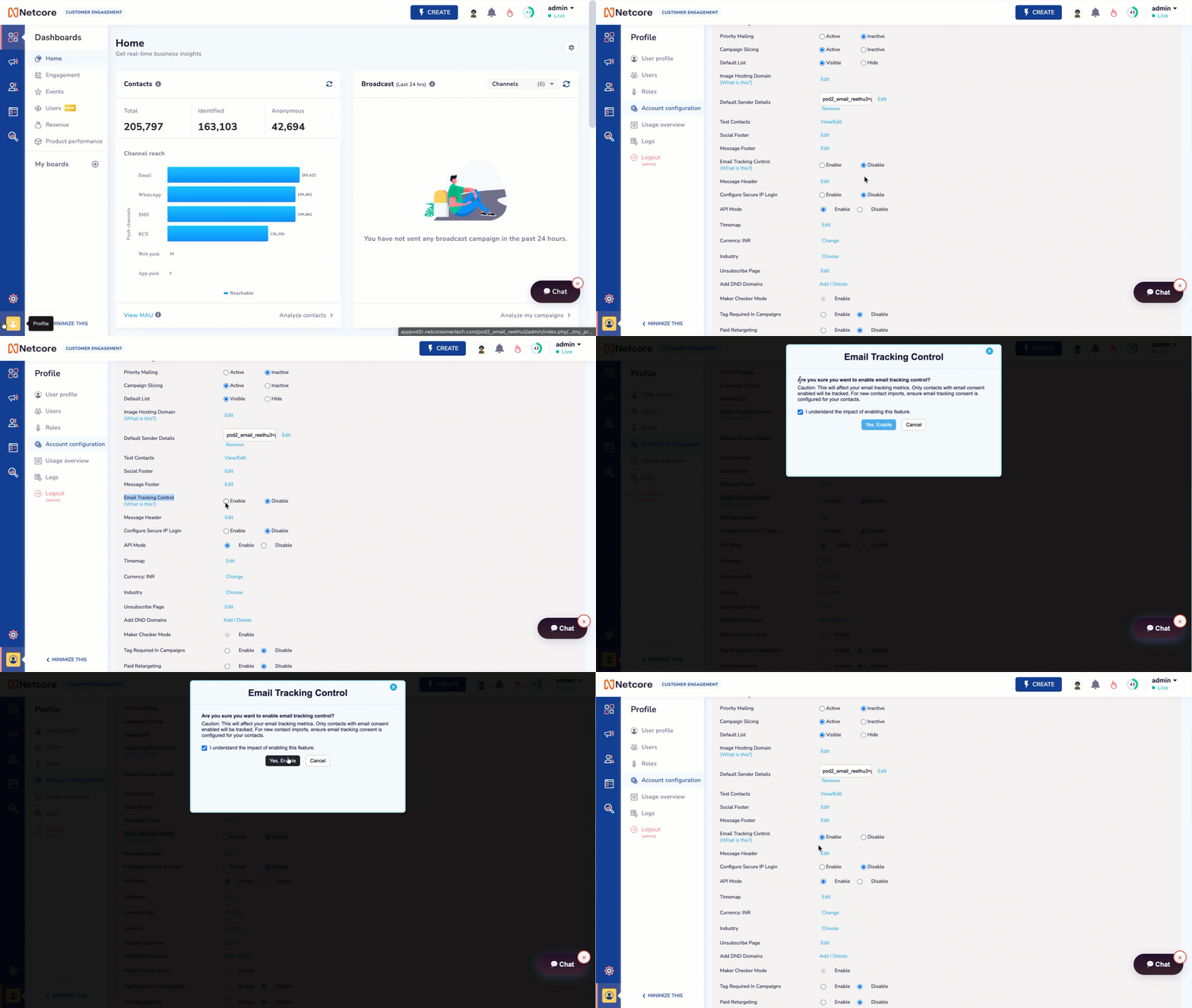
Enable Email Tracking Control
Follow the steps given below to enable Email Tracking Control.
-
Log in to the Netcore CE dashboard and navigate to Profile > Account Configuration.
-
Find Email Tracking Control. It's set to Disable by default.
-
Select Enable. A confirmation dialog appears. It explains that this will affect your email tracking metrics, and that Netcore will track only contacts with consent enabled going forward.
-
Check "I understand the impact of enabling this feature." Then select Yes, Enable. The button stays disabled until you check this box.
To return to standard tracking for all contacts, select Disable. This takes effect from your next send.
NoteMap the consent attribute on your contacts before you enable this feature, wherever possible. Contacts without a mapped value default to no tracking. An incomplete rollout of the attribute will under-report your tracking metrics
Impact on reporting
Enabling this feature doesn't change any reporting parameters. Your open rate and click rate fields stay the same. Netcore doesn't add a new metric or a new denominator.
ImportantBecause the fields don't change, your open rate and click rate can look misleading after you enable this feature. These rates continue to calculate against your full sent list, but only consented contacts actually get tracked. So a drop in open rate or click rate after enabling this feature doesn't necessarily mean engagement dropped. It may just mean fewer contacts are eligible for tracking. Keep this in mind when you compare performance before and after enabling the feature
Frequently asked questions
Q. Does this affect delivery?
A. No. Every contact still receives the email. Only open tracking, click tracking, and the View in Browser link are affected.
Q. Can I apply this to only a specific segment or region?
A. There's no separate segment- or geography-based toggle. The feature works account-wide once enabled. To scope enforcement, for example, to French contacts only, set the consent attribute selectively on that segment.
Q. What happens to contacts I haven't set a consent value for?
A. Netcore treats them as not consented. It won't track them while the feature is enabled.
Q. Does disabling this delete consent data I've collected?
A. No. Disabling only stops the platform from enforcing consent-gated tracking. Your consent attribute values stay on the contact records.
Q. Will unsubscribe links stop working if a contact hasn't consented?
A. No. Netcore always excludes unsubscribe and preference-centre links from tracking and click-wrapping, regardless of the consent setting.
Updated about 2 months ago