
Dynamic Product Feed
Fill email product blocks automatically with your best selling, most viewed, trending, or newest catalog products.
Overview
Dynamic product feed lets you build an email product block around a set of high-performing products instead of picking products manually. Choose what kind of products the feed should return, such as Best Sellers or Trending, and Netcore ranks your catalog against that definition every time the feed data refreshes.
Dynamic feeds are built on aggregated product signals across all your users. Every recipient of the campaign sees the same products in the block.
PrerequisitesBefore you begin, make sure the following prerequisites are completed:
- The product catalog must be synced to Netcore through Product Catalog Integration (PCI).
- Product View/Purchase Configuration: The events that represent a Product View and Purchase must be configured. Since event names can differ across accounts, the relevant events must be explicitly mapped in the Product View/Purchase Configuration.
- Non-Shopify accounts: Product context mapping must be configured between the product identifiers in the Product View and Purchase events and the matching product identifiers in the catalog. The onboarding or integrations team can set this up.
- Shopify accounts: The Shopify plugin automatically syncs the catalog and aligns the product and event identifiers. Dynamic feeds become available once the catalog has synced and event data is flowing.
- Product context mapping links the product identifier sent in a Product View or Purchase event to the matching product in the catalog. Without this mapping, Netcore cannot identify which catalog product an event belongs to and cannot rank products based on views or sales.
- If these prerequisites are not complete, Best Sellers, Most Viewed, and Trending feeds are unavailable. Custom feeds continue to work as they do.
Important Point to Remember
- Once an event is configured as the Product View or Purchase event, it cannot be deleted while the mapping is active.
- This prevents dynamic feeds and other dependent features from breaking unexpectedly.
- Rankings are not recalculated in real time, so changes in product activity are reflected only after the next feed refresh.
Why Use Dynamic Product Feeds
Keeping product recommendations fresh across recurring campaigns can require constant manual effort. Dynamic Product Feeds automate this process by continuously selecting products based on what is performing best in the catalog. Use Dynamic Product Feeds to:
- Keep product content fresh: Automatically update the products shown in recurring emails without manually editing the product block before every send.
- Promote what customers are engaging with: Surface best-selling, most-viewed, or trending products based on recent customer activity.
- Keep campaigns relevant to current demand: Use a selected activity period to reflect recent product performance rather than relying on a fixed product selection.
- Target specific product categories: Combine product performance with catalog filters to promote products from a specific category, brand, price range, or other catalog attribute.
- Avoid repetitive product selections: Automatically refresh the product mix as customer activity and product performance change.
- Reduce campaign maintenance: Set the product selection criteria once and let the feed update according to the catalog's sync frequency.
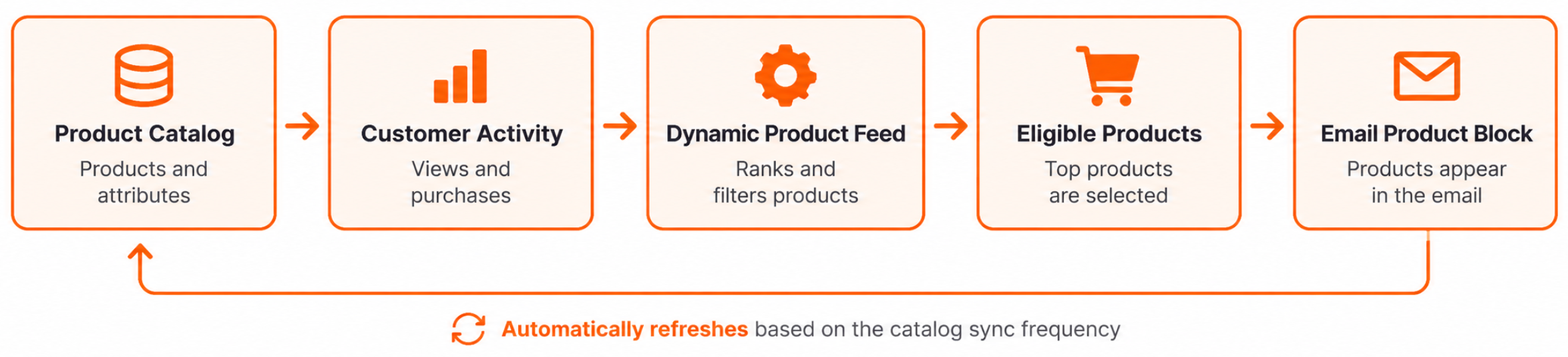
Workflow of Dynamic Product Feed
Create Dynamic Product Feed
Log in to Netcore CE panel and navigate to Content > Product and open the Product feed tab.
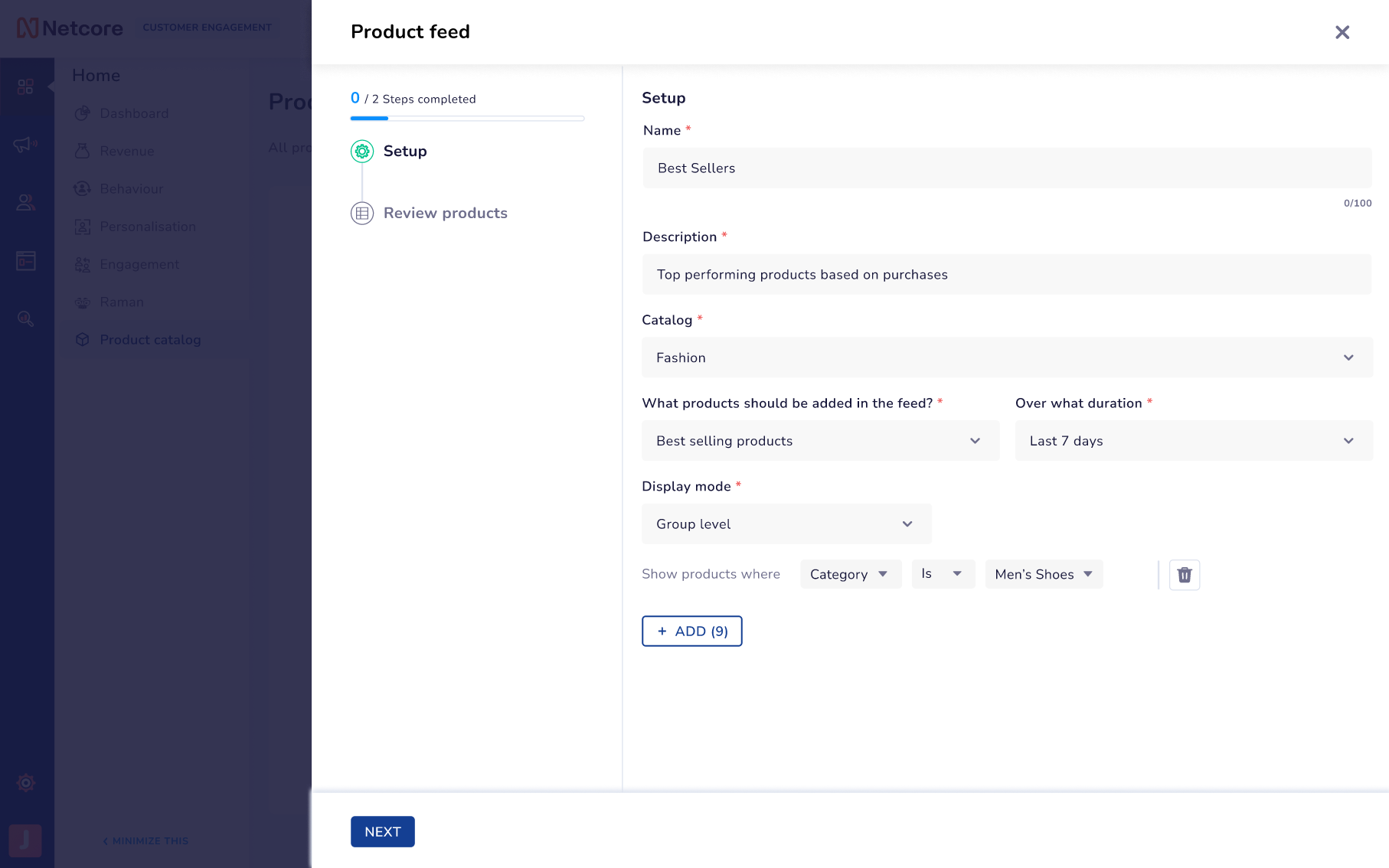
Set up Dynamic Product Feed
- Click CREATE PRODUCT FEED to create a new feed.
- Enter a Name for the feed and a Description.
- Then select a Catalog from the drop down. Refer here on how to set up a Catalog.
- In What products should be added in the feed?, choose a feed type from the below options:
| Feed type | What the block shows |
|---|---|
| Best Sellers | Best Sellers are the highest selling products.
|
| Most Viewed | The most viewed products. |
| Trending | A combination of product views and quantity sold within the selected duration |
| Newest Products | Your most recently added products |
| Custom | Products you pick yourself, the way product feeds work today |
- In Over what duration, choose how far back Netcore should look: Last 3 days, Last 7 days, Last 14 days, Last 30 days, Last 60 days, or Last 90 days.
- Optionally, narrow the feed down under Show products where. Pick an attribute, an operator, and a value, then use the delete icon to remove a condition you no longer want. and Save the feed.
- Choose a Display mode between th below and click NEXT.
| Display mode | What the block shows |
|---|---|
| Variant level | Every variant is shown separately. For example, A red shirt in size S, another red shirt in size S, and another red shirt in size L can each take one slot. |
| Group level | One card per product is displayed. For example, a red shirt can only appear once, no matter how many sizes it has. |
- Then review the products selected in the feed and click SAVE. t is now available to attach to a product block in the email editor.
Use the Feed in Email
Once the Dynamic Product Feed is created, attach it to a product block in the Unified Content Editor to attach the products in an Email Campaign. Follow the steps below to do so.
Log in to the Netcore CE panel and Open the email template in the Unified Content Editor.
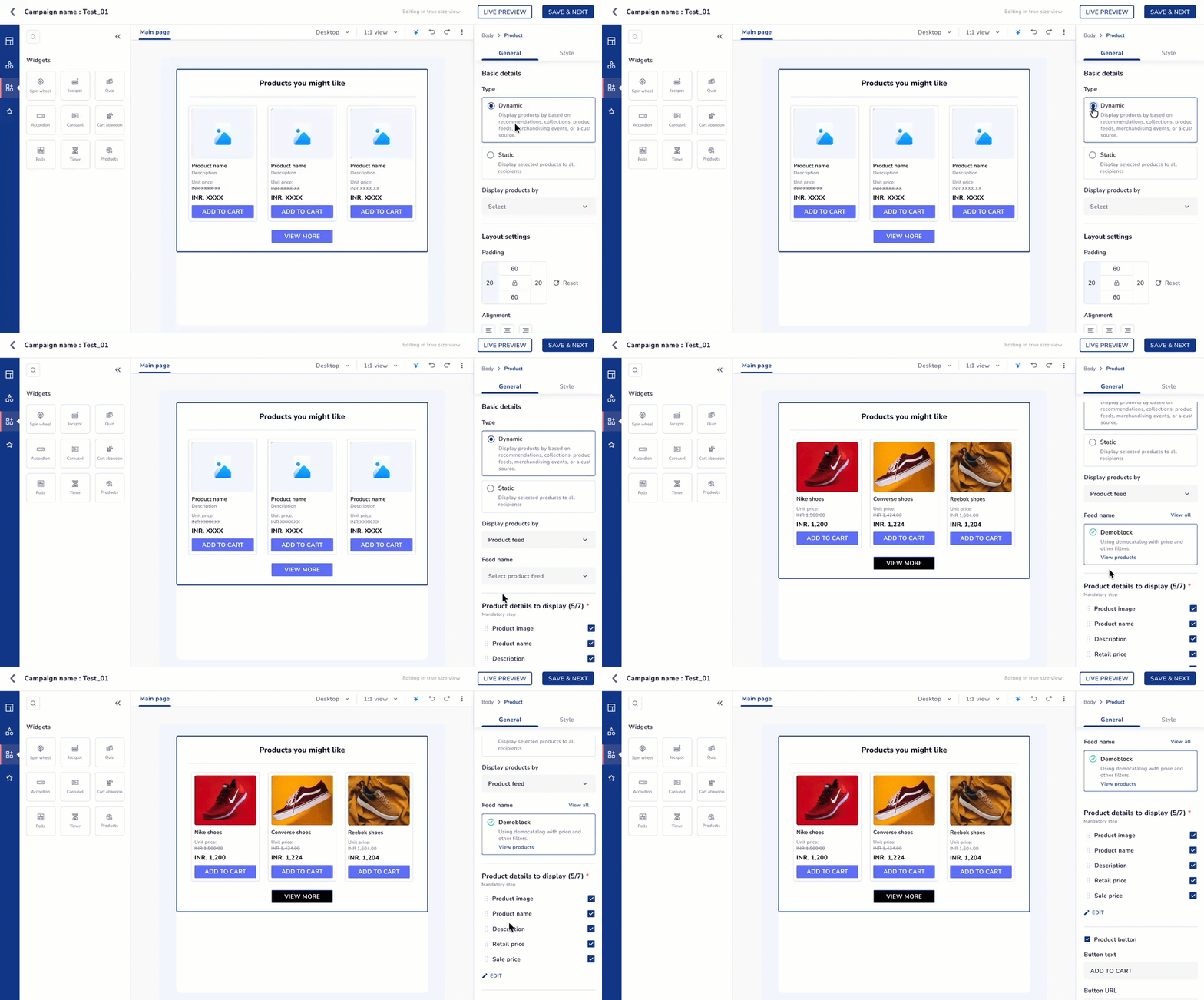
- Drag the Products block onto the canvas from the Widgets section.
- Under General, set Type to Dynamic.
- Select Product Feed as the dynamic source.
- Next to Products to display, click SELECT and choose your saved feed.
- Next to Product details to display, click Edit. Choose up to seven details such as name and price, map the attributes, set the redirection URLs, and click Save.
- Set No. of products to the number of products the block should show.
- Adjust No. of images in a row, Product Alignment, and the Style options to suit your template.
- Click Live Preview to check how the block renders, and send yourself a test email to confirm the products resolve as expected.
- Click Save & Next to continue with your campaign.
If Dynamic Product Feed is DeletedA template that uses a deleted product feed shows the error Feed used in this template has been deleted. If the campaign is already running in a journey, the email is dropped while the journey stays active.
Use Case
An online fashion retailer sends a weekly email every Thursday featuring its best-selling products. Previously, the team had to check the week’s sales and manually update the products before every send.
With a Best Sellers feed, this process is automatic:
- Select the Fashion catalog.
- Choose Best Sellers as the feed type.
- Set the duration to Last 7 days.
- Select Group level to show each style only once, regardless of size.
- Filter the feed to Women’s Footwear.
Add the feed to the weekly email template once. Every Thursday, the hero block automatically shows the products that sold best over the last 7 days.
Troubleshoot and FAQs
Q. Why might the products in my email change from one send to another even if I haven't changed the feed?
A. A Dynamic Product Feed is not a fixed product list. As product activity and catalog data change, the products that qualify and their ranking can also change. The feed refreshes according to the catalog's sync frequency.
Q. Why doesn't a product that just became popular immediately appear in the feed?
A. Dynamic Product Feeds are not updated in real time. New product activity is reflected when the feed refreshes according to the selected catalog's sync frequency.
Q. Why might a product with strong sales not appear in my email?
A. Strong sales alone do not guarantee that a product will appear. The product must meet the feed's selection criteria and any configured filters. Products that are inactive or do not have an image are also excluded from the feed output.
Q. Why are multiple variants of the same product appearing in my email?
A. If the feed uses Variant level, each variant can occupy a separate product slot. For example, different sizes or colors of the same product can appear as separate items. Use Group level when each product should appear only once.
Q. Can I use a Dynamic Product Feed to show different products to different customers?
A. No. Dynamic Product Feeds use aggregated product activity across users. All recipients of the campaign see the same products in the product block; the feed does not provide one-to-one product personalization.
Updated 6 days ago