
Yotpo
Connect Yotpo with Netcore CE to sync customer data and events. Use them to build segments and trigger personalized campaigns.
Overview
Yotpo is a platform for loyalty, referrals, and reviews. The Netcore and Yotpo integration brings that activity into Netcore.
A customer earns points, reaches a new tier, refers a friend, or leaves a review. Yotpo sends the event to Netcore. Netcore logs the event on the contact's activity timeline. You then use the event to trigger journeys and campaigns across channels.
The integration also syncs your existing Yotpo customers into Netcore. Each customer becomes a contact, matched by email address.
How the integration works
| Stage | What happens |
|---|---|
| Connect | You sign in to Yotpo from Netcore and approve access. |
| Sync | Netcore imports your existing Yotpo customers in the background. |
| Listen | Yotpo sends events to Netcore as they happen. |
| Act | Netcore logs each event. Events for points, tiers, and loyalty membership also update contact attributes. |
What Netcore receives
| Yotpo data | Where it lands in Netcore |
|---|---|
| Customers | Contact profiles. Netcore updates a contact if the email exists. Otherwise, it creates a new contact. |
| Loyalty and review events | Events on the contact's activity timeline. You use them as journey triggers. |
| Points balance, tier name, VIP tier, referral code, referral link | Custom contact attributes. You use them to build segments. |
Events versus attributesAn event records something that happened, such as "Tier upgraded". An attribute stores the current state, such as "Current tier: Gold". Segments need attributes. Journeys need events. Netcore keeps both.
Benefits
- Message at the right moment. Trigger a journey when a customer earns points, unlocks a tier, or redeems a reward.
- Segment on live loyalty data. Netcore keeps tier and points balance current on each contact. Your segments stay accurate.
- Reach customers on any channel. Use Yotpo events in cross-channel journeys.
- Set up once. Choose your events, map your attributes, and start.
- Control what you receive. Four events are on by default. You turn on the rest only if you need them.
- Stay safe on uninstall. If you uninstall the app from Yotpo, Netcore keeps your data and pauses your journeys.
Use Cases
Refer to the given table to know the most common use cases for this integration.
| Category | Use case | Trigger |
|---|---|---|
| Loyalty points | Confirm points earned and show the new balance | Points earned |
| Loyalty points | Warn customers before their points expire | Points expiring |
| Tiers | Celebrate a tier upgrade and share the new benefits | Tier upgraded |
| Tiers | Win back customers after a tier downgrade | Tier downgraded |
| Referrals | Send a discount to a referred friend | Referral link shared |
| Referrals | Thank the referrer and confirm their points | Referral completed |
| Redemptions | Tell customers a reward is available | Reward available |
| Redemptions | Confirm a coupon redemption and point to the next milestone | Coupon redeemed |
| Redemptions | Confirm a custom reward and share fulfilment steps | Custom reward redeemed |
| Lifecycle | Welcome new members with a Day 0, Day 3, and Day 7 series | Loyalty programme joined |
| Lifecycle | Send a birthday reward | Birthday |
| Reviews | Thank customers who leave a 4 or 5 star review and suggest products | Review submitted |
| Reviews | Start a recovery flow for a 1 to 3 star review | Review submitted |
| Reviews | Tell reviewers when their review goes live | Review published |
| Segmentation | Build segments by loyalty tier, high unspent points, or near a tier upgrade | Contact attributes |
| Combined campaigns | Add live product ratings and review content to a loyalty message | Any event above |
Review requestsYou can send review requests after delivery from Netcore. This use case runs on your Shopify order data, not on a Yotpo event. Yotpo stops the reminder when the customer submits a review.
Supported events
Four events are on by default. You turn on the others during setup.
| Event | Netcore event name | When it fires | Default |
|---|---|---|---|
| Points earned | yotpo.points_earned | A customer earns points. | On |
| Tier upgraded | yotpo.tier_upgraded | A customer moves up a tier. | On |
| Loyalty programme joined | yotpo.loyalty_joined | A customer joins the loyalty programme. | On |
| Review submitted | yotpo.review_submitted | A customer submits a review. | On |
| Points expiring | yotpo.points_expiring | A customer's points are about to expire. | Optional |
| Tier downgraded | yotpo.tier_downgraded | A customer moves down a tier. | Optional |
| Referral link shared | yotpo.referral_shared | A customer shares a referral link. | Optional |
| Referral completed | yotpo.referral_completed | A referred friend completes the referral. | Optional |
| Reward available | yotpo.reward_available | A customer earns a coupon. | Optional |
| Coupon redeemed | yotpo.coupon_redeemed | A customer redeems a coupon. | Optional |
| Custom reward redeemed | yotpo.custom_reward_redeemed | A customer redeems a custom reward. | Optional |
| Birthday | yotpo.birthday | It is a customer's birthday. | Optional |
| Review published | yotpo.review_published | A review goes live. | Optional |
Example: Celebrate a Tier Upgrade
Acme Store uses Yotpo Loyalty with Silver, Gold, and Platinum tiers. Acme wants to email a customer when the customer reaches Gold.
Set up the journey
- Connect the Yotpo integration. Tier upgraded is on by default.
- Open Journey Builder and create a new journey.
- Set the entry trigger to the Tier upgraded event. Find it under web activity, for the Shopify website you selected in the integration.
- Add an email step.
- Write the email. Insert the new tier name, the old tier name, and the points balance from the event.
- Publish the journey.
What happens at run time
- A customer earns enough points to reach Gold in Yotpo.
- Yotpo sends the tier change to Netcore.
- Netcore logs the Tier upgraded event on the contact's timeline.
- Netcore updates the contact's tier attribute to Gold.
- The journey starts. The customer receives the email.
Event data available to the email
| Field | Example value |
|---|---|
| New tier name | Gold |
| Old tier name | Silver |
| Points balance | 1,250 |
Because Netcore also updates the tier attribute, Acme can build a "Gold members" segment for later campaigns.
Connect Yotpo with Netcore
Prerequisites
Netcore blocks the Add integration button until you meet both requirements.
| Requirement | Why it matters | If it is missing |
|---|---|---|
| The account primary key is Email ID | Netcore matches Yotpo customers to contacts by email. | Contact your Netcore account team. |
| You have integrated at least one Shopify website | Yotpo events attach to your Shopify website. | Integrate a Shopify website from the Getting started list. |
Connect from the Netcore dashboard
- Log in to the Netcore CE dashboard and navigate to Settings > Integrations.
- On the Catalog tab, scroll to Loyalty & rewards.
- Select the Yotpo tile. A panel opens with an overview.
- Check the Getting started list. Both items must show Completed.
- Click Add integration.
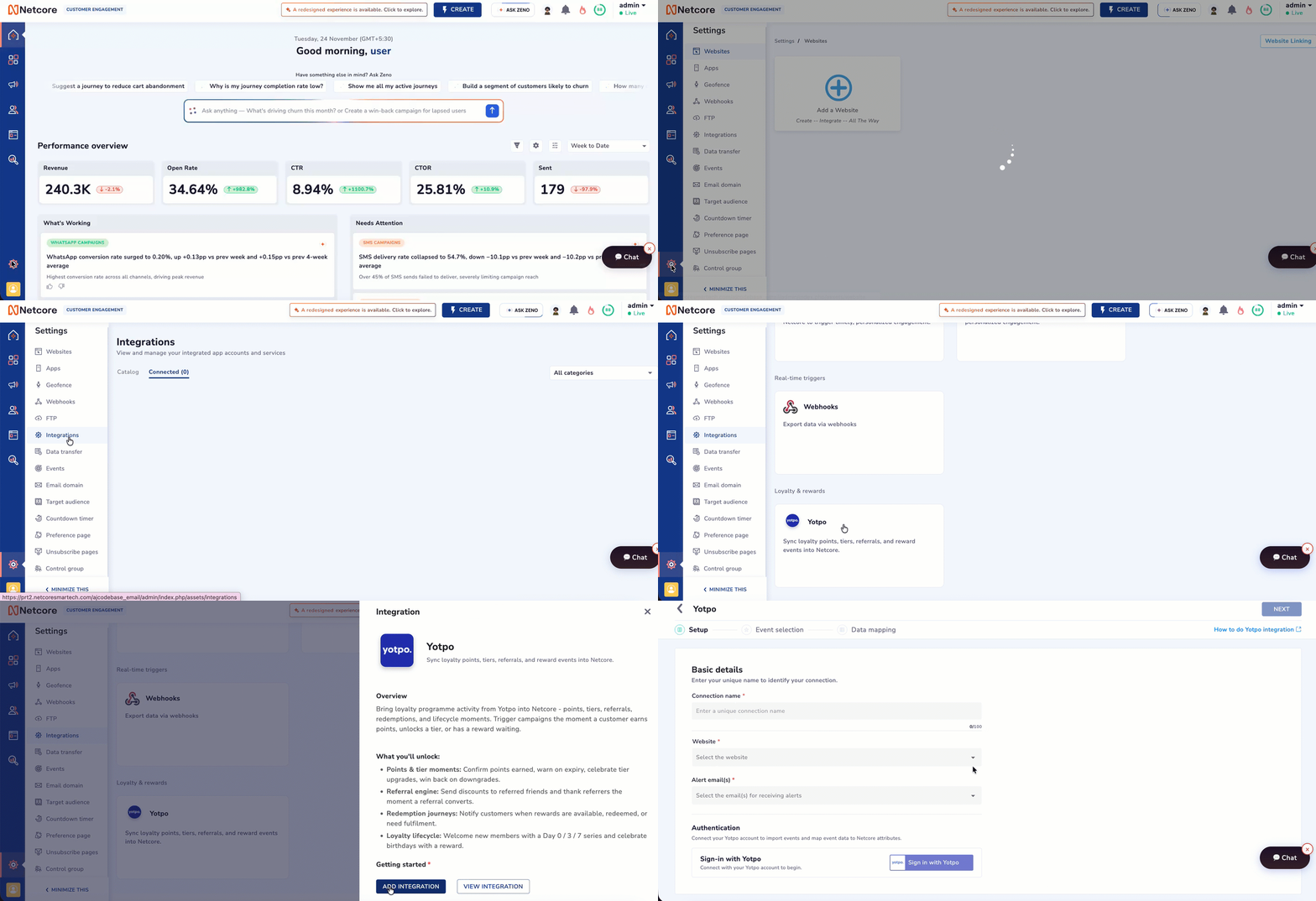
Add Yotpo Integration in Netcore CE dashboard
Step 1: Setup
- Enter a unique Connection name. You have up to 100 characters.
- Select your Shopify website. If you have one active Shopify website, Netcore selects it for you. If you have several, choose one. Each integration uses one active Shopify website.
- Select the Alert email(s) that receive integration alerts.
- Under Authentication, click Sign in with Yotpo.
- Sign in to Yotpo and approve access.
- Return to Netcore. The page shows Yotpo account connected.
- Click Next.
Step 2: Event selection
- Review the list of Yotpo events.
- Keep the default events on. They are always on.
- Turn on any optional events you need. Netcore shows which events update contact attributes and which only log to the activity timeline.
- Click Next.
Step 3: Data mapping
-
Review the primary key mapping. Netcore maps Yotpo Email Address to the Netcore EMAIL primary key. This mapping is mandatory.
- Under Additional attribute mapping, select a Netcore attribute for each Yotpo field you want to sync. Examples include Customer ID, Phone Number, First Name, and Last Name.
- To store a field in a new attribute, create the attribute from this screen.
- Check the data types. Netcore pre-fills them. You do not set them.
- Complete the setup.
Step 4: Sync status
Netcore starts the initial customer sync and shows a progress screen. The sync runs in the background.
Connect from the Yotpo Marketplace
- In Yotpo, open the App Marketplace and find Netcore.
- Click Install. Yotpo redirects you to Netcore.
- Sign in to Netcore if prompted.
- Review the consent screen and approve access.
- Complete the setup steps described above.
What the initial sync does
- Netcore fetches your Yotpo customers in batches.
- For each customer, Netcore checks the email address.
- If the contact exists, Netcore updates it.
- If the contact does not exist, Netcore creates it.
- Netcore syncs the mapped attributes. These include points balance, tier name, VIP tier, referral code, and referral link.
Uninstall the App from Yotpo
If you uninstall the Netcore app from Yotpo, Netcore reacts as follows.
| Item | Result |
|---|---|
| Integration status | Changes to inactive. |
| Your data | Netcore keeps it. |
| Active journeys | Netcore pauses them and shows a notification. |
| Your team | Netcore notifies you. |
Updated about 1 hour ago